The Tool-Selection Scorecard: Pick a Project Tool Your Whole Team Can Explain
When your team picks its next project tool with this scorecard, everyone can see why it won: which questions mattered most, how each tool scored, and what the plan really costs at your seat count. Set the weights, score up to three tools, and the spreadsheet does the math.
Excel workbook (opens in Google Sheets and Numbers too): Scorecard, a worked Example, a Real cost calculator, and the Scoring guide.
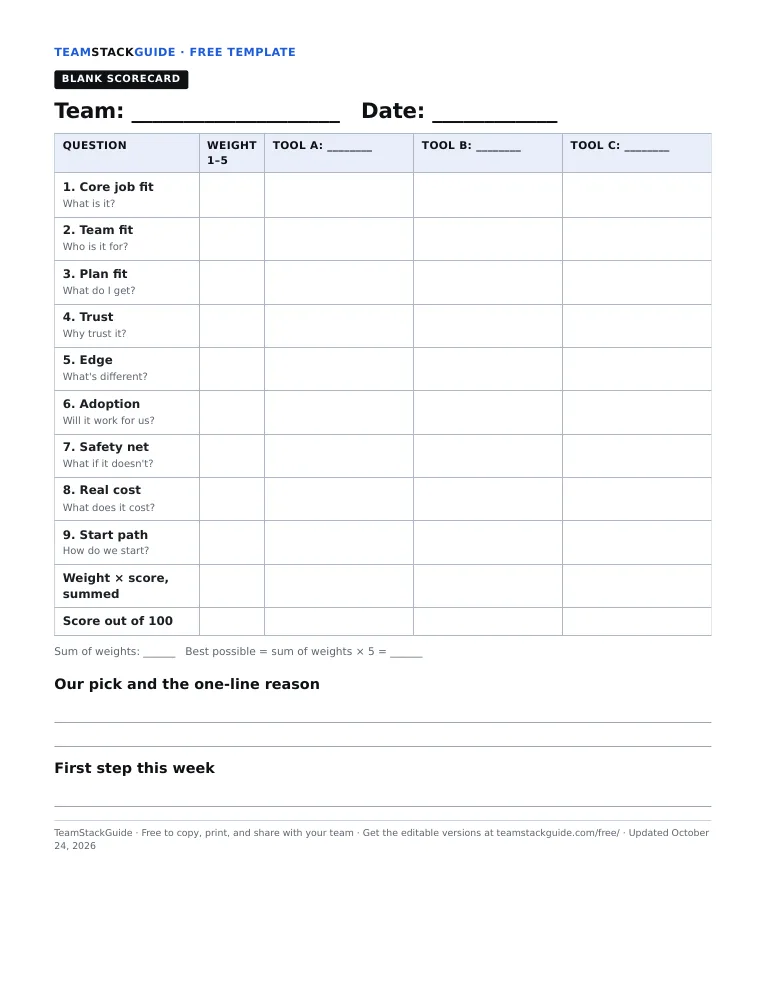
- Printable PDF · 4 pages, US Letter: how to use it, the scoring guide, the blank scorecard, and the filled-in example.
- CSV version · The nine questions with blank weight and score columns, for Notion or any spreadsheet.
No email and no account needed: every file downloads directly. See our privacy policy.
What's inside
- Nine questions, the questions our reviews and comparisons are built around: core job fit, team fit, plan fit, trust, edge, adoption, safety net, real cost, and start path. See how we use them.
- Weights your team sets, from 1 (nice to have) to 5 (deal-breaker), in their own cells, so changing one updates every total.
- A score out of 100 per tool: the sum of weight × score, divided by the best possible total. A "scores missing" counter shows when a column is still incomplete.
- A Real cost tab that multiplies the per-seat price by the seats you'd actually pay for, monthly and yearly, because some vendors sell seats in bundles. For 13 tools, the project management cost calculator does this from current list prices; for Asana's bundles, use the Asana vs ClickUp cost calculator.
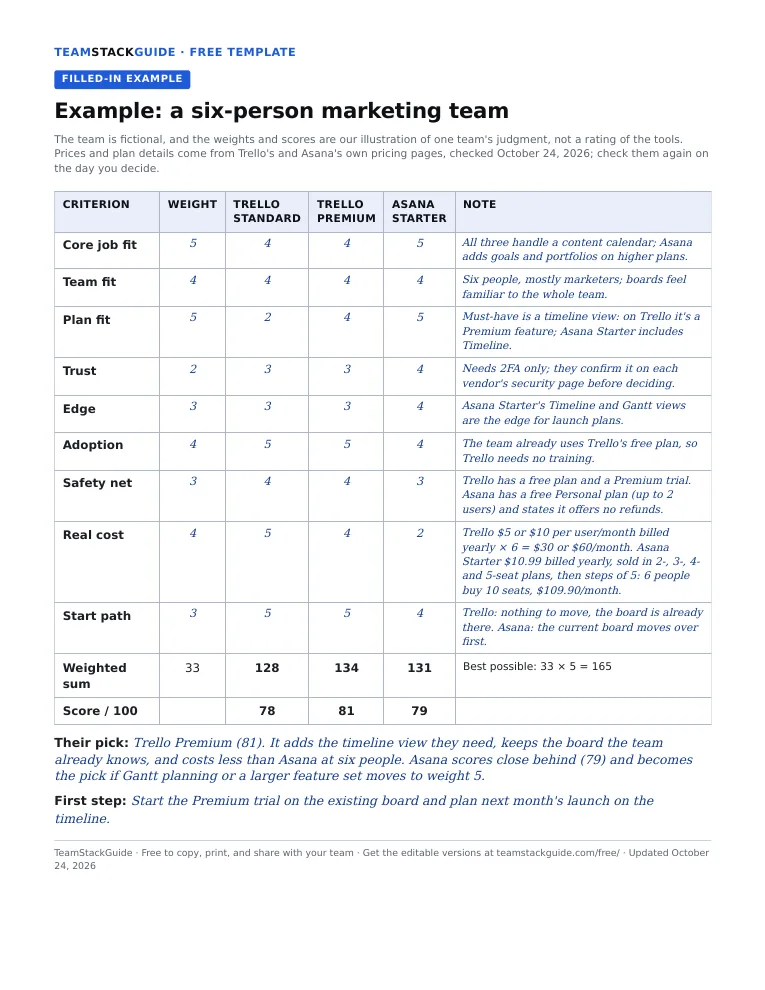
- A worked example for a fictional six-person marketing team comparing Trello Standard, Trello Premium, and Asana Starter, with prices from each vendor's pricing page checked October 24, 2026.
How to use it in three steps
- Set the weights first, as a team, before anyone opens a pricing page.
- Score each tool 1 to 5 from the vendor's own pricing and feature pages, plus a hands-on trial where one is offered.
- Read the totals together and write one line: our pick, and why. Then take the first step that week.
The weights are the real decision. Two teams can score a tool the same way and still pick differently, because they care about different questions.
Scoring the top plan while budgeting for the cheapest one. Score the exact plan you'd pay for, at your real seat count.
Score one tool twice, on two plans. In the example, Trello Premium edges out Trello Standard because it adds the timeline view the team needs, and the scorecard shows that before anyone pays for an upgrade.
A fourth or fifth tool. Three columns are plenty; narrow your shortlist with our best project management software guide first.
Who it's for
Teams choosing or switching a project management, automation, or collaboration tool, and the person who has to explain the choice afterward. It works just as well for automation tools; our Make vs Zapier vs n8n comparison answers the same nine questions you'll score here.
Good to know
- The example team is fictional, and its weights and scores illustrate one team's judgment. They aren't a rating of Trello or Asana.
- Prices and plans change. Check the vendor's pricing page on the day you decide; the example's prices are dated October 24, 2026.
More free templates
- The Weekly Review Template: A 35-minute end-of-week routine in five parts, so Monday starts with three priorities your team already agreed on.
- Plan 2027: The Team Planning Template: Look back at 2026, set three goals, and map every 2027 project to an owner, a date, and a quarter.
Free to print, copy, adapt, and share with your team. See all free templates.