The Weekly Review Template: Finish Friday With Next Week Already Planned
Picture Monday morning with your team's three priorities already chosen, each with an owner and a clear finish line. This template gets you there in about 35 minutes at the end of each week, with the same five parts every time, so the habit sticks.
4 pages, US Letter: how to use it, the blank template, and a filled-in example.
- Markdown version (for Notion) · Bring it in with Notion's Markdown import, then duplicate the page each week.
- Project-check table (CSV) · Opens in any spreadsheet or imports into Notion as a database; the rows are a fictional example.
No email and no account needed: every file downloads directly. See our privacy policy.
What's inside
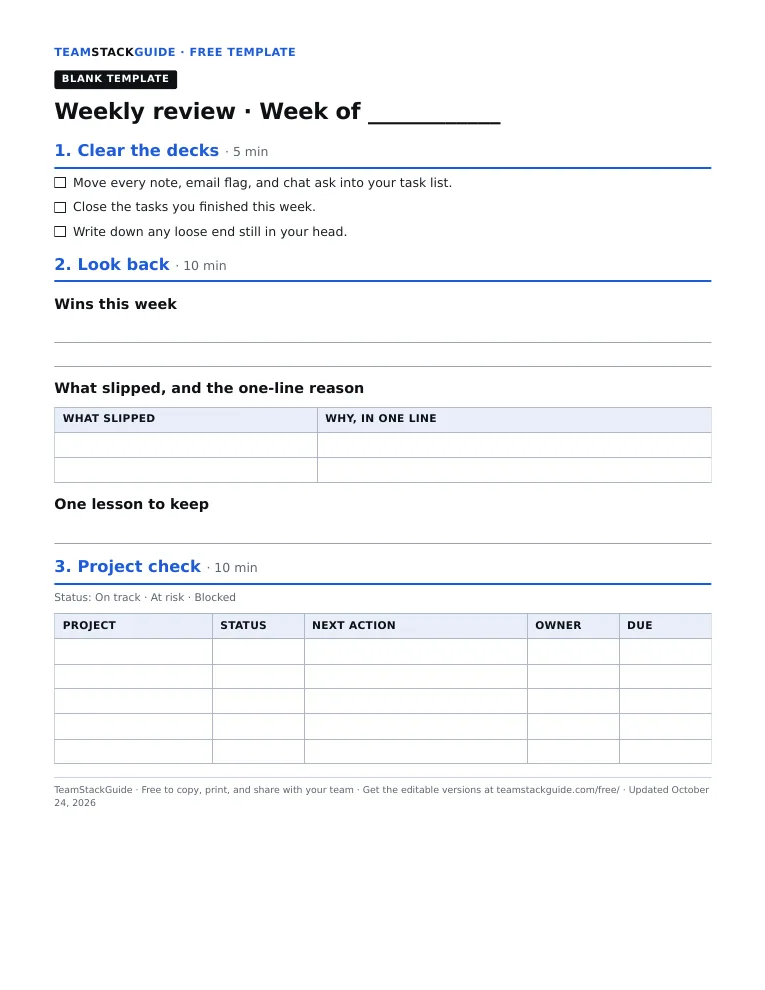
- Clear the decks (5 minutes): every loose note and chat ask lands in one task list, so nothing waits in someone's head over the weekend.
- Look back (10 minutes): wins, what slipped with a one-line reason, and one lesson to keep.
- Project check (10 minutes): one row per project with status, next action, owner, and due date, so "at risk" shows up while there's still time to act.
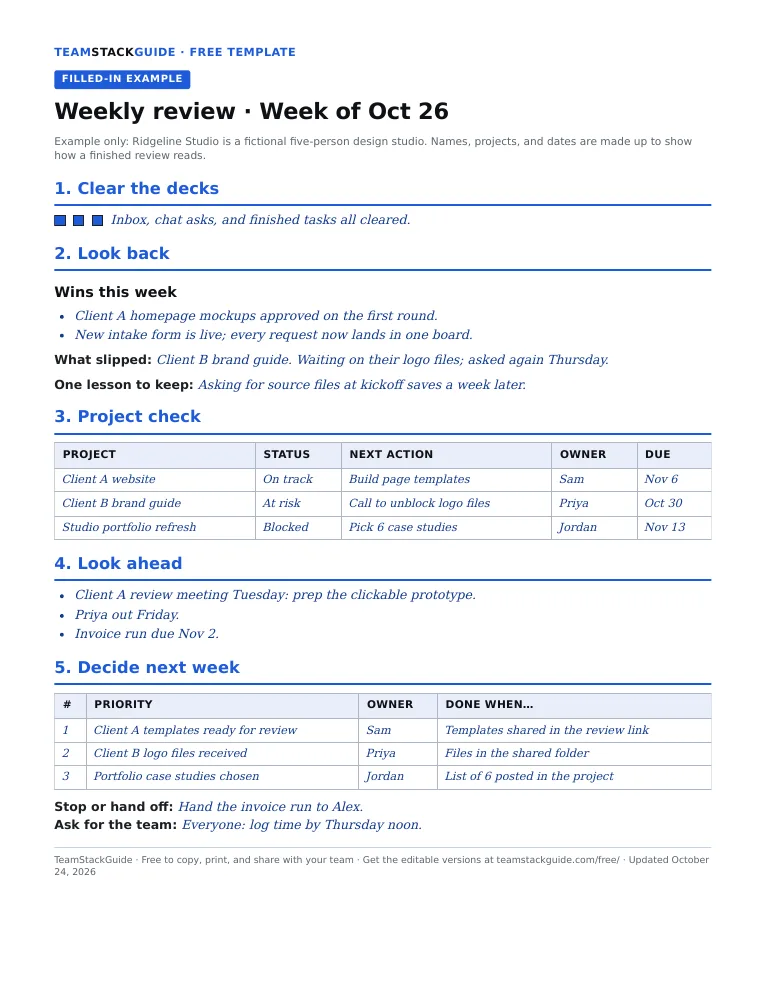
- Look ahead (5 minutes): deadlines, meetings that need prep, and who's out over the next two weeks.
- Decide next week (5 minutes): three priorities, each written as an outcome with an owner and a "done when" line.
- A filled-in example from a fictional five-person design studio, so you can see how a finished review reads before you write your own.
How to use it in three steps
- Pick one time you'll keep. Same slot every week, booked as a recurring 35-minute event.
- Work top to bottom. The five parts each have a time box, so the review stays short.
- Share the top 3. Post them where your team already works: your project tool, team chat, or Monday's stand-up.
The review you repeat every week beats a perfect one you run once. Short and steady is what turns it into a habit.
Turning the review into a planning marathon. Pick three priorities and let the rest of the list wait on the board where it already lives.
Save the blank as a recurring task or a page template in the tool you already use, so a fresh copy is waiting each Friday.
The "one lesson" line, for your first month. Get the habit going first; the lessons show up on their own.
Who it's for
Team leads, agency owners, and project managers running a team of roughly 3 to 15 people who want one short routine that keeps every project visible. It works with any project tool, and on paper. When you're ready to pick the tool the review lives in, our guide to the best project management software compares nine options with prices checked October 24, 2026, and the Tool-Selection Scorecard helps your team decide.
Good to know
- The time boxes are suggestions. Your first two or three reviews may run longer while the project list settles.
- The example team, names, and dates are made up to show the format.
More free templates
- The Tool-Selection Scorecard: Nine questions, weights your team sets, and a score out of 100 for each tool, with a worked Trello vs Asana example.
- Plan 2027: The Team Planning Template: Look back at 2026, set three goals, and map every 2027 project to an owner, a date, and a quarter.
Free to print, copy, adapt, and share with your team. See all free templates.